The hours go into writing up
At the six offices we work with, writing up a report without AI took six to eight hours. Taxira drafts text from your own recording, with the source excerpt alongside it. You review and finalise the report.
Explore a worked example
Interactive example
From a property note to a draft.
Fictional data and prepared results. This example uses no live AI and sends nothing.
What comes in
Inspection note: ‘In the living room I see wooden frames with double glazing. I do not have information about the roof insulation yet.’
Example result
See what could be ready after this input.
Want to dictate? Open the existing contact-details voice demo
Try entering your contact details with a short recording, or use the example without a microphone. This demo shows how spoken information is placed into fields.
For example: “I am Sam Example from Example Office, example at example dot com.”
- You speak for fifteen seconds.
- The recording is transcribed.
- The fields fill in, each with its quote.
For this demo, we send your recording to a transcription service. Use example details; do not include client or case information.
Inside the product
See the text. And where it came from.
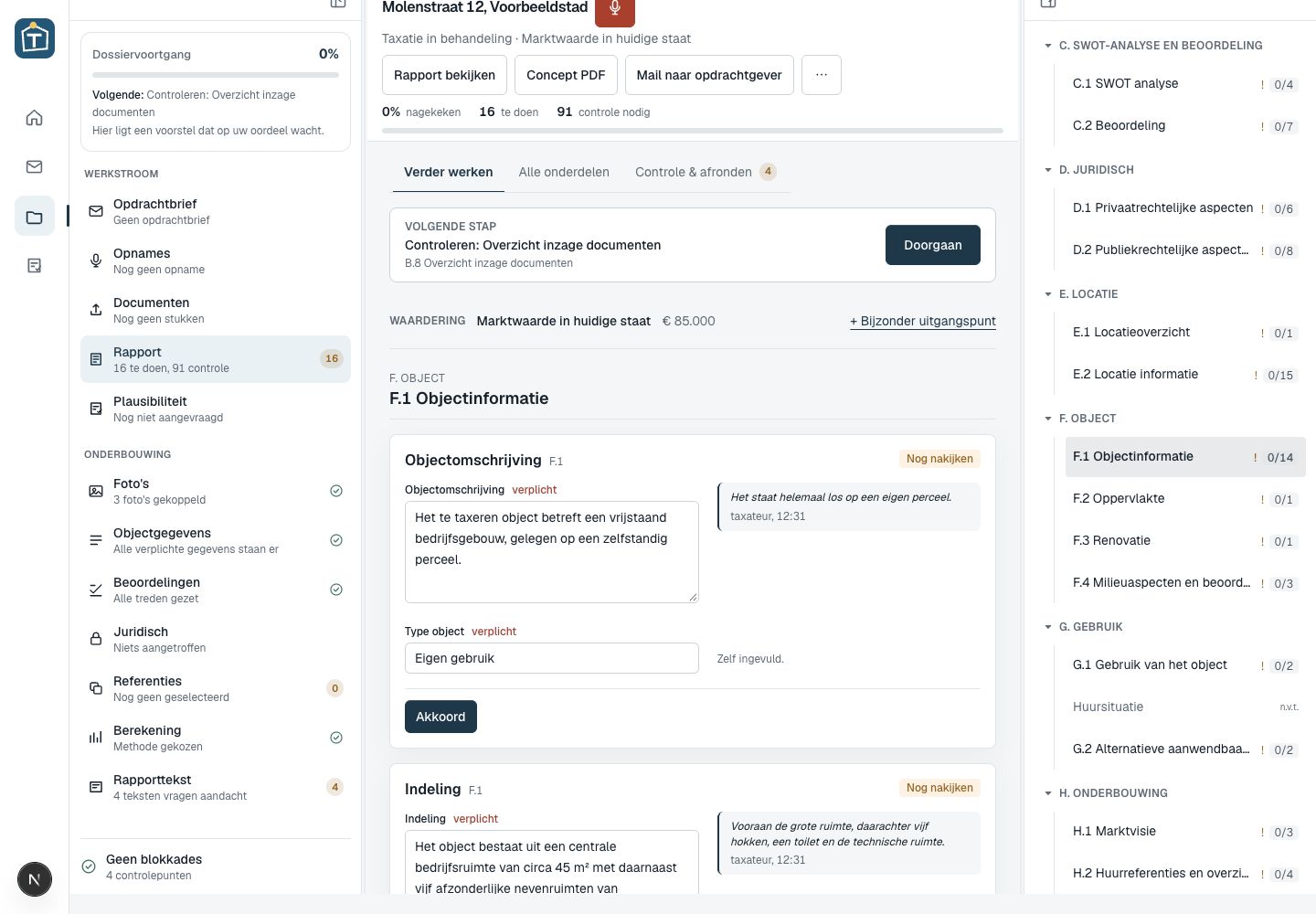
This is the actual dossier screen in Taxira. It shows a test dossier with fictional names and property details.
- 01
From recording to field
The property description appears in its report field, with the recording quote, speaker and timestamp alongside.
- 02
Review where it matters
The ‘Nog nakijken’ status shows that a populated field is still awaiting review. The appraiser checks and signs it off.
- 03
Missing information stays visible
The dossier separates outstanding work from items needing review. A draft becomes a completed report only after the required information and checks are complete.
Where could this take work off your team?
What you can look up later, and what you cannot
What sits in a register you can look up. The rest is in your head, and it leaks away on the drive back.
Reconstructing is the expensive part
Not the typing, the remembering.
Typing faster is not automation
You work quicker. The work stays.
You cannot grow on a full diary
No hour spare to train anyone.
What writing up costs you now
Your figures, and the hours going into write-up today.
This counts towards the last figure: freed-up write-up time only becomes a report if the visit fits as well.
Only to put a price on the hours. Leave it at zero if you would rather look at time.
Your arithmetic with your figures. The last figure uses the hour of write-up we see at six firms, below. It is room in your diary, not revenue: whether that room fills up is down to your market.
Try the demoWhat it saves
Less time on the first draft
6-8 hrs
writing up, without AI
4 hrs
with a language model
1-2 hrs
with Taxira, measured at six firms
Almost everyone makes the first jump themselves by now: a language model lets you write faster. The work is still there. At the six firms we work with, writing up comes out at one to two hours.
What changes about a report
Same visit, same report.
After the visit
How it goes nowReconstructing from memory
With the copilotThe recording does the groundwork
The first draft
How it goes nowTyping from nothing
With the copilotA draft per report field
Where did this come from
How it goes nowYou still remember, you think
With the copilotA quote with a timestamp
What you forgot to ask
How it goes nowSurfaces while writing up
With the copilotSits in the still to check list
Land registry and build year
How it goes nowLook up and retype
With the copilotAlready filled in
A second report that day
How it goes nowDoes not fit
With the copilotMore capacity, depending on your schedule
Who signs it off
How it goes nowYou
With the copilotYou
How it works
You talk the way you always talk.
Record your observations
On your phone, during or after the visit.
Facts with evidence
Every value carries a timestamped quote.
Text per report field
The layout of your own report.
Check and take over
Copy what is right.
You decide what goes into the report
You are the appraiser. This tool drafts, you sign off.
- Shows the source for completed fields
- Picks no NRVT grade
- Never states hearsay as fact
- Sets no market value
- Signs nothing off
Would this work for us?
The structure follows the Dutch appraisal report. Each section shows its content, source and what still needs to be checked.
- Appraisal firms writing up reports
- Estate agencies with an appraisal arm
- Individual appraisers without office support
- Offices that want to write more reports with the same team
What appraisers ask us
Am I still responsible for the report?
Yes. The tool drafts, you judge, correct and sign off. Your name is on the report.
How can I check the completed fields?
Each completed value includes the source excerpt from the recording. Check that the text matches the source and edit the draft where needed. A source reference does not replace your review.
What happens to the recording and the data?
The recording goes to the transcription service once and is discarded afterwards. No case archive is built up.
Our report looks different. Can it still work?
Probably, but not without work. A different report format means mapping your report first.
Do we need to hire or retrain anyone?
No. You record the way you already do. Only the write-up afterwards changes.
What does it cost?
It depends on how you work and which documents you want out of it. Thirty minutes tells us what it yields for you.
Does the tool pick the NRVT grade or the market value?
No. It describes the observation; the judgement and the valuation stay yours. It picks no comparables and makes no statement about plausibility either. That is not an omission but the limit of what a tool may do on an appraiser's behalf.
What does it do with what the owner tells you?
It stays a statement by the owner and is never presented as established fact. The text records where it came from, with the quote and the timestamp beside it, so that on review you can see who said something and when.
Thirty minutes, and you know what it saves you
What this looks like at your firm depends on how you work and which documents you want out of it. We are not going to guess at that.
Book a demo